 Home
Home
 Exhibition
 Draw
Draw
 Rules
Rules
 Suggestions
 About
About

How to play
Gameplay
Guess the drawing before other players to earn more points. Type your guess in the answer field. The first player to reach the point goal wins the game. Both the guesser and the artist are awarded points for a correct guess.
Players take turns drawing. At the beginning of their turn, the artist is given a choice of two words. The chosen word becomes the subject of their drawing. The artist has 20 seconds to choose a word. If they don't choose within this time, they lose their turn.
All players have the same amount of drawing time, even after a correct guess. This makes for a smoother, more engaging game, giving players time to chat and the artist time to complete and refine their drawing. The only exception is if all players have already guessed the drawing; in that case, the round ends immediately and a new one begins.
The drawing toolbox panel works as follows:
 -> Draw freehand lines
 -> Erase the selected area
 -> Draw a filled rectangle with the selected color
 -> Draw an empty rectangle with the selected color
 -> Draw a filled circle with the selected color
 -> Draw an empty circle with the selected color
 -> Draw a straight line with the selected color
 -> Fill a specific closed area with the selected color
 -> Copies a custom color from the drawing
 -> Clear the entire drawing and starts from scratch
 -> Undo the last action
 -> Redo the last action
 8
8
 1.0
-> Increase or decrease brush size and color opacity
1.0
-> Increase or decrease brush size and color opacity
Once the drawing word is selected, the artist can provide hints. These hints show the number of letters in the word and can reveal random letters from it. The number of hints you can give depends on the word's length, with longer words allowing more hints. Be careful, though: each hint you reveal reduces the maximum points for the round by 1, affecting both the artist and the players who guess correctly. In other words, the more hints you give, the easier your drawing is to guess, but the fewer points you earn when players guess correctly.
An artist can skip their turn even after choosing a word, but they cannot skip if a player has already guessed the drawing correctly.
In a full 10-player room, the first person to guess correctly earns 10 points, the second 9, and so on, with later guesses earning progressively fewer points.
For the artist's points, assuming no hints were given, when the first player guesses correctly, the artist earns 11 points (equivalent to the 10 points of the first correct guesser plus one bonus point for being the artist). For each subsequent correct guess, the artist always earns 2 additional points.
If the room is not full (for example, with 6 players), the point system remains the same for guessers and the artist. The points awarded simply scale with the number of players in the room. For instance, with 6 players, the first correct guesser earns 6 points, the second 5, and so on.
Players take turns drawing. At the beginning of their turn, the artist is given a choice of two words. The chosen word becomes the subject of their drawing. The artist has 20 seconds to choose a word. If they don't choose within this time, they lose their turn.
All players have the same amount of drawing time, even after a correct guess. This makes for a smoother, more engaging game, giving players time to chat and the artist time to complete and refine their drawing. The only exception is if all players have already guessed the drawing; in that case, the round ends immediately and a new one begins.
The drawing toolbox panel works as follows:
-> Draw freehand lines
-> Erase the selected area
-> Draw a filled rectangle with the selected color
-> Draw an empty rectangle with the selected color
-> Draw a filled circle with the selected color
-> Draw an empty circle with the selected color
-> Draw a straight line with the selected color
-> Fill a specific closed area with the selected color
-> Copies a custom color from the drawing
-> Clear the entire drawing and starts from scratch
-> Undo the last action
-> Redo the last action
-> Select default colors for the tools
-> Display the currently selected color
-> Select a custom color
Once the drawing word is selected, the artist can provide hints. These hints show the number of letters in the word and can reveal random letters from it. The number of hints you can give depends on the word's length, with longer words allowing more hints. Be careful, though: each hint you reveal reduces the maximum points for the round by 1, affecting both the artist and the players who guess correctly. In other words, the more hints you give, the easier your drawing is to guess, but the fewer points you earn when players guess correctly.
(7):
A
t
x
i
e
An artist can skip their turn even after choosing a word, but they cannot skip if a player has already guessed the drawing correctly.
In a full 10-player room, the first person to guess correctly earns 10 points, the second 9, and so on, with later guesses earning progressively fewer points.
For the artist's points, assuming no hints were given, when the first player guesses correctly, the artist earns 11 points (equivalent to the 10 points of the first correct guesser plus one bonus point for being the artist). For each subsequent correct guess, the artist always earns 2 additional points.
If the room is not full (for example, with 6 players), the point system remains the same for guessers and the artist. The points awarded simply scale with the number of players in the room. For instance, with 6 players, the first correct guesser earns 6 points, the second 5, and so on.
Player Interactions
Below is the player panel:

 Player_1


 Player_2
![]()
 ...
...
![]()
 Player_10
The player panel shows all players in the room, sorted by arrival or by score. You can click on any player to view their details:
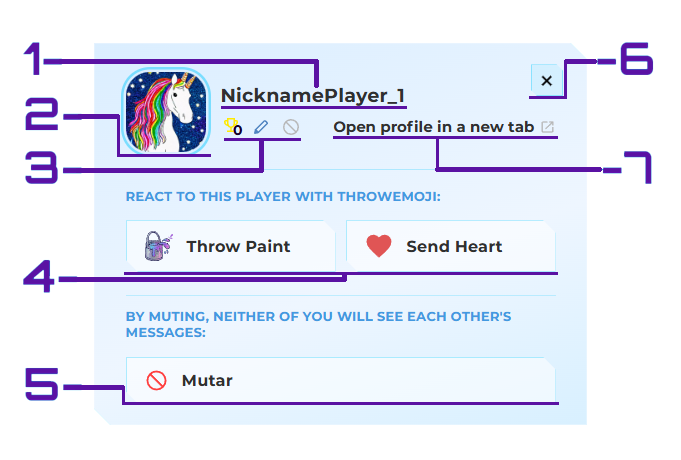
The example above shows the details panel for a player in the room other than yourself. Here is an explanation of the basics regarding how a player's panel works:
1. This is the player's nickname. For players with a profile, this nickname is created uniquely and exclusively at the time of registration. For guest players, a temporary nickname must be created before entering the room.
2. This is the player's profile picture. It can be the avatar image linked to their Google account, or an official game avatar, provided the player has unlocked enough avatars.
3. These are the player's information counters. The trophy icon with a number below it indicates how many times the player has won in that room since joining. The pencil icon indicates in how many rounds the player will be drawing (usually counting the next 3 players scheduled to draw). The mute icon indicates how many players have muted this player.
4. These are the 'Throwemoji' buttons. Throwemojis are custom Artixie emojis that can be thrown at other players in the room. Once used, there is a cooldown period before they can be thrown again. Throwemojis also influence the player's daily reputation in the exhibition.
5. The mute button prevents a muted player's messages from appearing to the person who muted them. If a player is bothering you, do not hesitate to mute them. When you mute a player, their messages in the main chat or the answer chat will no longer appear to you, and your messages will not appear to them either. Everyone in the room will know who muted whom. You can unmute any player after one minute.
6. This button closes the player details panel.
7. This link opens the player's full profile in a new tab.
Note that all the descriptions provided here regarding the player details panel refer to the core basics. There may be variations depending on the player type such as players with accounts, players without accounts, and your own panel. Explore as you play to discover more.
Player_1
90 Points
Player_2
82 Points
...
... Points
Player_10
12 Points
The player panel shows all players in the room, sorted by arrival or by score. You can click on any player to view their details:
The example above shows the details panel for a player in the room other than yourself. Here is an explanation of the basics regarding how a player's panel works:
1. This is the player's nickname. For players with a profile, this nickname is created uniquely and exclusively at the time of registration. For guest players, a temporary nickname must be created before entering the room.
2. This is the player's profile picture. It can be the avatar image linked to their Google account, or an official game avatar, provided the player has unlocked enough avatars.
3. These are the player's information counters. The trophy icon with a number below it indicates how many times the player has won in that room since joining. The pencil icon indicates in how many rounds the player will be drawing (usually counting the next 3 players scheduled to draw). The mute icon indicates how many players have muted this player.
4. These are the 'Throwemoji' buttons. Throwemojis are custom Artixie emojis that can be thrown at other players in the room. Once used, there is a cooldown period before they can be thrown again. Throwemojis also influence the player's daily reputation in the exhibition.
5. The mute button prevents a muted player's messages from appearing to the person who muted them. If a player is bothering you, do not hesitate to mute them. When you mute a player, their messages in the main chat or the answer chat will no longer appear to you, and your messages will not appear to them either. Everyone in the room will know who muted whom. You can unmute any player after one minute.
6. This button closes the player details panel.
7. This link opens the player's full profile in a new tab.
Note that all the descriptions provided here regarding the player details panel refer to the core basics. There may be variations depending on the player type such as players with accounts, players without accounts, and your own panel. Explore as you play to discover more.

